Feature Overview
Needle Engine is a fully-fledged 3D engine for the web with everything you'd expect from a modern 3D engine, and more. Build stunning web experiences that work everywhere – from browsers to VR headsets to mobile AR.
See It In Action
Explore our Samples and Showcase to experience what's possible.
Cross-Platform: Desktop, Mobile, VR, and AR
One codebase, every platform. Needle Engine runs everywhere web technology does – desktop, mobile, AR, and VR. We build Needle Engine with XR in mind as an integral part of responsive web design.
 Native iOS WebXR Support
Full WebXR on iPhone and iPad – no app required! 🎉
Native iOS WebXR support is now available through App Clip technology. Users can experience your WebXR AR content instantly via QR codes or links, without installing an app. Powered by ARKit, it provides:
- Hit testing and plane detection
- DOM overlays for UI elements
- Image tracking
- Anchor creation and tracking (work in progress)
- Lighting estimation (work in progress)
Try it now • Read iOS WebXR docs
Everywhere Actions for iOS and Android
Use Everywhere Actions for interactive AR experiences on both iOS and Android using USDZ and QuickLook. Perfect for product configurators, marketing experiences, and interactive storytelling.
Platform Support:
- VR Headsets: Meta Quest, Apple Vision Pro, Pico, HTC Vive, Valve Index
- Mobile AR: Android (WebXR), iOS (WebXR via App Clips + USDZ/QuickLook)
- Desktop: All modern browsers
- Image Tracking – WebXR image tracking on Android, QuickLook image tracking on iOS
- Future devices work automatically – that's the power of web standards
Graphics and Rendering
Shaders and Materials
Professional-grade rendering on the web. Export both PBR Materials and Custom shaders created with Shader Graph or other systems.

Use Unity's node-based ShaderGraph to create shaders for the web. Artists can keep creating without worrying about syntax or web-specific code.
Read more: PBR Materials • Custom Shaders • MaterialX
FastHDR Environment Lighting
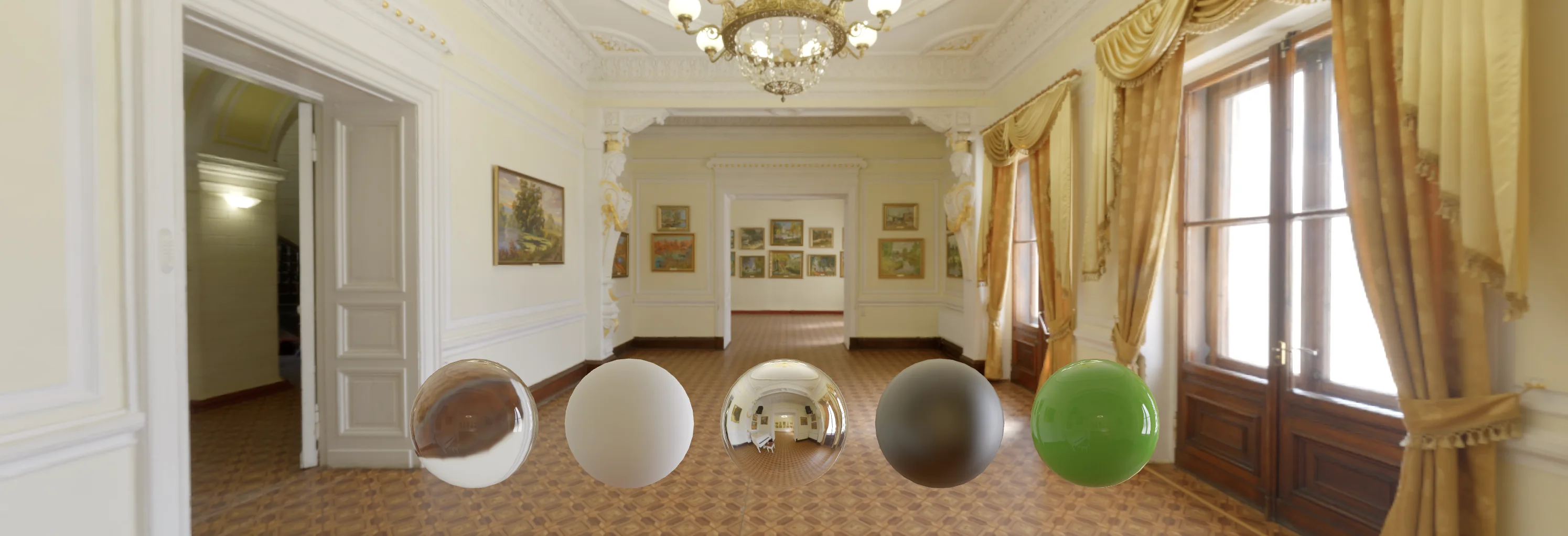
Ultra-fast, high-quality HDRI lighting — a Needle Engine exclusive.
FastHDR is a GPU-native environment map format that loads 10x faster than EXR, uses 95% less VRAM, and requires zero CPU processing. Your scenes get stunning environment lighting that works beautifully even on budget phones and low-end devices.
- 4K environment in ~134 ms (EXR: ~1,261 ms)
- 12 MB VRAM (EXR: 256 MB)
- Zero frame drops, zero main thread work
- Automatic conversion during production builds
Lightmaps
Beautiful baked lighting, automatically exported to the web.
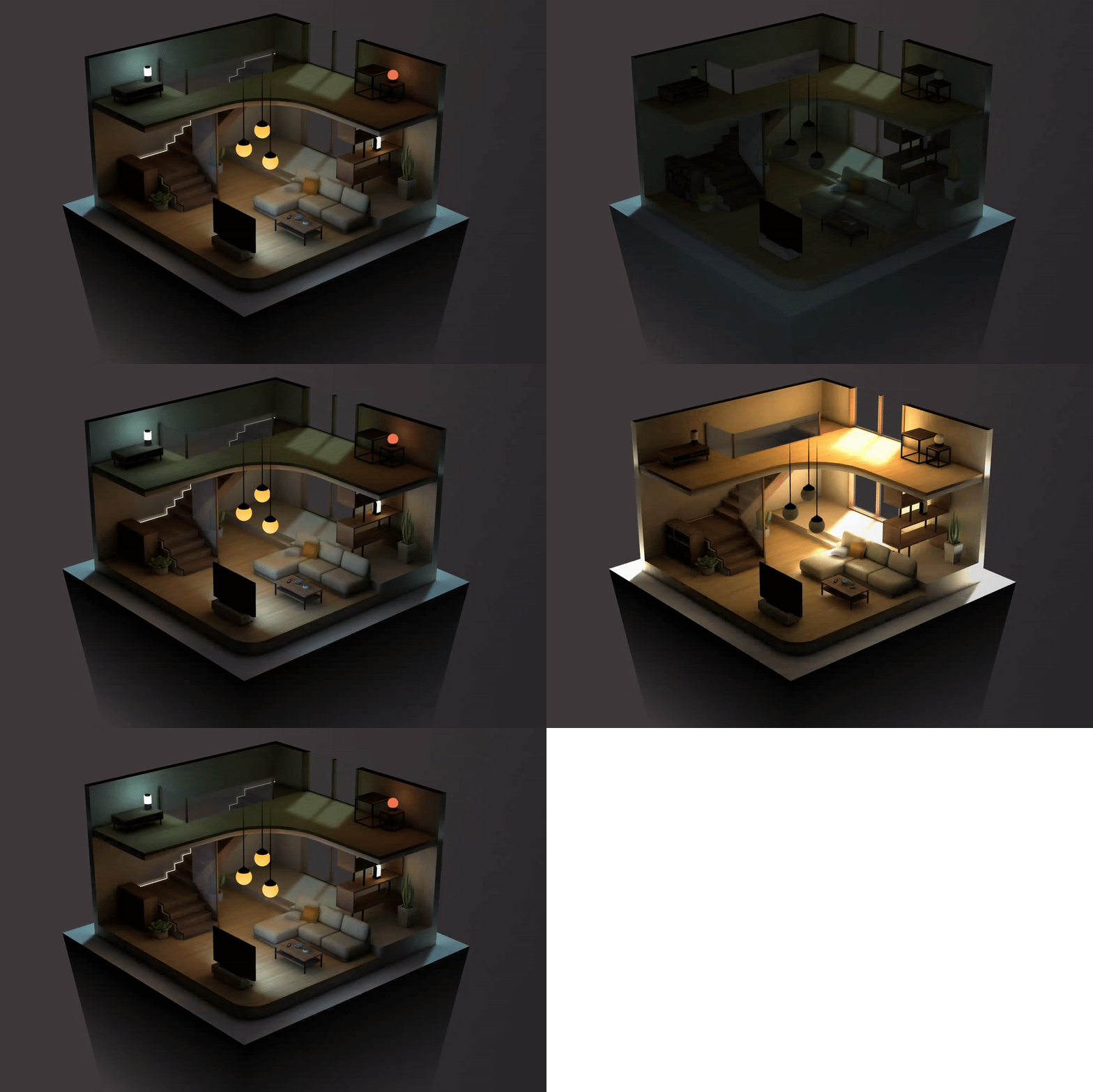
Lightmaps can be baked in Unity or Blender and automatically exported to your web experience. Just mark objects as static, add lights (or use emissive materials), click bake, and Needle Engine handles the rest. What you see in the editor is what you get on the web.
Flexible Setup:
- Works with Unity's built-in lightmapper
- Compatible with third-party lightmappers like Bakery
- Per-scene lightmaps automatically loaded
Read more about exporting Lightmaps
MaterialPropertyBlocks
Per-object material customization without breaking batching.
MaterialPropertyBlocks allow you to override material properties on individual objects while sharing the same base material, maintaining performance through efficient batching and instancing.
Key Features:
- Override material properties per object without creating new material instances
- Support for both transparent and opaque rendering on the same material
- Automatic shader define management
- Texture coordinate transforms per object
- Used internally by lightmaps, reflection probes, and see-through effects
Common Use Cases:
- Apply unique lightmap textures to objects sharing the same material
- Per-object environment maps for localized reflections
- Dynamic transparency effects (X-ray vision, see-through walls)
- Color variations across instanced objects
- Per-object texture tiling and offset
Read the MaterialPropertyBlock guide
Post-Processing Effects
Industry-standard post-processing for the web.
Built-in effects include Bloom, Screen Space Ambient Occlusion (SSAO), Depth of Field, and Color Correction. You can also create custom effects tailored to your project.
See all post-processing components
Animation and Sequencing
Powerful animation tools that translate directly to the web. From simple animations to complex state machines and cinematic sequences – Needle Engine brings professional animation workflows to web experiences.
Animator State Machines

Unity's Animator and AnimatorController let you set up animations and define conditions for blending between them. Needle Engine exports:
- Animation state machines
- StateMachineBehaviours with
OnStateEnter,OnStateUpdate, andOnStateExitevents - Transitions and layers
- Parameter-driven state changes
Limited support for sub-states and blend trees
Sub-states and Blend Trees are not yet supported.
Timeline Sequencing

Create cinematic sequences with Unity's Timeline. Needle Engine translates Timeline setups into web-ready format.
Supported Tracks:
- AnimationTrack
- AudioTrack
- ActivationTrack
- ControlTrack
- SignalTrack
Limited support for sub-timelines
Sub-Timelines are not yet supported. Custom timeline tracks can be exported – see example.
 Blender Support
Animation support extends to Blender too! Create animation state machines and export NLA tracks as timelines directly from Blender.
Read more about Animation Components
 Physics (Rapier)
Real-time physics simulation in the browser, powered by Rapier.
Add realistic physics interactions using familiar components — no additional setup or dependencies required:
- Rigidbodies for dynamic objects
- Colliders: Box, Sphere, Capsule, and Mesh
- Physics materials for friction and bounce
- Raycasting and collision detection
- Character controllers for player movement
Works from code without any editor — add physics to any object at runtime:
import { Behaviour, Rigidbody, BoxCollider } from "@needle-tools/engine";

export class PhysicsBox extends Behaviour {
    start() {
        // Add physics to any object — Rapier is built in
        const rb = this.gameObject.addComponent(Rigidbody);
        rb.useGravity = true;
        this.gameObject.addComponent(BoxCollider);
    }
}
Use Physics Guide • Physics Components
Particle Systems
Create stunning visual effects with Unity's Shuriken particle system.
Export Unity ParticleSystems to the web with support for:
- World/local space simulation
- Box and sphere emitter shapes
- Emission over time and burst emission
- Velocity and color over lifetime
- Emission influenced by velocity
- Texture sheet animation
- Basic trails
User Interface
Build interactive UIs using Unity's Canvas system.
Export Unity UI components including:
- Text (with custom fonts and auto-generated font atlas, extensible character sets)
- Images and sprites
- Buttons with events
- Layout groups
- World-space and screen-space canvases
Multiplayer and Networking
Real-time multiplayer, built-in.
Networking is integrated into the core runtime. Deploy multiplayer 3D environments in seconds with built-in networked components. Synchronizing variables and state is incredibly simple.
Features:
- Built-in networking components
- Easy variable synchronization
- Voice chat support (VoIP)
- Works seamlessly with XR
- Quick deployment to Glitch with included server
Read more about Networking • Scripting Guide
Editor Integrations
Visual authoring meets web deployment.
Powerful integrations for Unity and Blender allow artists and developers to collaborate seamlessly. Set up and export complex scenes visually, with flexible workflows for both technical and creative team members.
 Unity Integration:
- Full component support
- Visual scene authoring
- Asset pipeline integration
- Hot reload during development
Blender Add-on (full-featured, first-class workflow):- Export glTF with Needle Engine components
- Animation support (NLA tracks, state machines)
- Material and lighting export including lightmapping
- 100+ built-in components available directly in Blender
- Hot reload — save in Blender, see changes instantly in the browser
- Get started with Blender →
Scripting and Development
Flexible, powerful, and developer-friendly.
Needle Engine uses a component-based architecture familiar to Unity developers. Create custom components in TypeScript or JavaScript.
Developer Features:
- Component-based workflow (like Unity)
- TypeScript and JavaScript support
- Modular npm-based packages
- TypeScript to C# component compiler – write TypeScript, get Unity components automatically
- Hot module replacement for fast iteration
- Full three.js access for advanced use cases
Read more: Scripting Reference • Npm Definition Files
Additional Features
Even more capabilities to power your projects:
- EditorSync – Live synchronize editing in Unity to your running web application for instant feedback during development
- Compression Pipeline – Automatic optimization for web delivery with glTF compression and texture optimization
- Progressive Loading – Instant scene display with progressive mesh and texture streaming via
@needle-tools/gltf-progressive - Audio Support – Spatial audio, audio sources, and audio listeners
- Image Tracking – WebXR image tracking on Android, QuickLook image tracking on iOS
- Custom Components – Extend the engine with your own components and systems
- Framework Integration – Works with React, Vue, Svelte, and other web frameworks
- Deployment Tools – Built-in deployment to Glitch, Vercel, and other platforms
Where to Go Next
Get Started:
- Getting Started Guide – Download and set up Needle Engine
- Unity Integration – Set up the Unity integration
- Blender Addon – Install the Blender addon
Learn More:
- Our Vision – Learn about our goals and philosophy
- Technical Overview – Deep dive into glTF and architecture
- XR Documentation – Build immersive AR and VR experiences
- Browse Samples – See what's possible
Start Building:
- Scripting Guide – Create custom components
- Component Reference – Browse all available components
- Deployment Guide – Publish your experiences
Have questions? Join our Discord community or check out our support resources.