---
title: Needle Mesh Baker — Generate, Optimize and Bake 3D Models
description: Generate 3D models, reduce triangles and draw calls, bake PBR textures, optimize animated and skinned 3D assets, or rebuild geometry with voxel remeshing and conservative wrap mode — locally in your browser.
image: https://cloud.needle.tools/-/media/cFXofjsyv3nAGCJOZvFGsw.gif
---
# Needle Mesh Baker
The **Needle Mesh Baker** generates and optimizes 3D models in your browser. It reduces triangles and draw calls, bakes appearance into textures, rebuilds difficult geometry, and optimizes skinned meshes while preserving their rigs and animation clips.
- **Built to render fast** — fewer triangles and draw calls, with potentially smaller files
- **Animation-aware** — preserve a skinned mesh and its clips, optimize an authored pose, or freeze a selected animation frame
- **Multiple geometry methods** — simplify authored topology, voxel-remesh difficult assets, create a conservative outer wrap, or bake textures without changing geometry
- **Keeps the look** — reduce the triangle count while preserving the silhouette and baking color, normals, roughness and metallic into textures
- **Bake on your GPU** — process complex models without an upload or processing queue. Bake times depend on your hardware and settings
- **No model? Generate one** — describe what you want, or drop in a single image, and the baker builds a 3D model from it, then optimizes it in the same place. That runs on your own GPU too
- **[WebMCP ready](#let-an-ai-agent-drive-it)** — use the ChatGPT app to directly control and use the Mesh Baker. Generate an image in ChatGPT, turn it into a 3D model in the baker, then optimize and compare the result — all in one conversation
- **Local processing** — models are processed in your browser. Uploading a result to Needle Cloud is optional ([privacy details](#is-my-model-uploaded-to-needle))
- **Yours to download** — the finished mesh comes back as a plain `.glb`
Drop in a model — or generate one — set a triangle budget, and compare the result against the source before you download it.
**[Open the Needle Mesh Baker →](https://mesh-baker.needle.tools)**
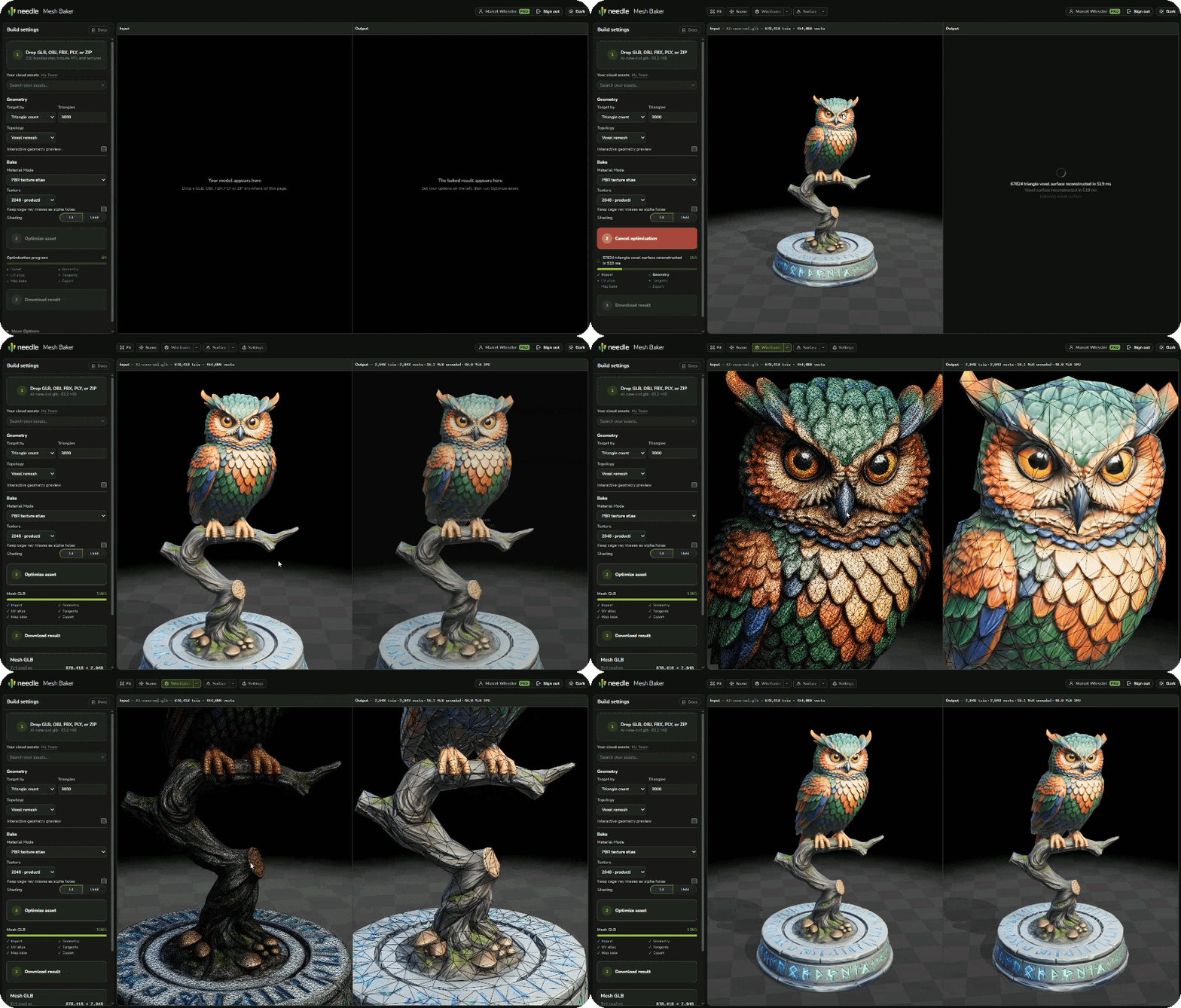 *The model on the left has 800,000 triangles. The model on the right has 6,000.*
## Quick Start
1. Open [mesh-baker.needle.tools](https://mesh-baker.needle.tools) in your browser
2. Drop a `.glb`, `.gltf`, `.obj`, `.fbx` or `.zip` onto the page — or load a model from your Needle Cloud library
3. Set your triangle budget under **Geometry**, or switch to targeting a maximum surface error
4. Press **Optimize asset**, then compare the result against the source in the two linked viewers
5. **Download** the result as a `.glb`
:::tip Local processing
Importing local files, baking, previewing and comparing all happen on your machine. Results are only uploaded to Needle Cloud when you choose to upload them. See [Is my model uploaded to Needle?](#is-my-model-uploaded-to-needle)
:::
## What it produces
An optimized glTF asset with the appearance of the original baked onto it. Depending on the selected workflow, the result can be a single atlased mesh, a structure-preserving animated asset, a remeshed surface, or a conservative wrap. It is useful for LODs, animated characters, background props, kitbashed scans, CAD imports and anything with more triangles, materials, or draw calls than it needs.
- **Far fewer draw calls** — however many meshes and materials went in, usually one mesh with one material comes out. Surfaces that have to be drawn differently, such as transparent ones, stay separate. On scenes built from many small parts this is often the bigger win, not the triangle count
- **Set a triangle budget**, or ask instead for a maximum deviation from the original surface and let the baker find the triangle count
- **Four geometry methods** — simplify authored topology, rebuild it on a voxel grid, create a watertight outer wrap, or keep the geometry and bake textures only
- **Draw-call reduction** — combine many source materials into an atlas and export one material where the selected workflow allows it
- **Skinned mesh and animation optimization** — retain rigs and clips while measuring simplification across sampled poses
- **Baked PBR textures** — base color, normal, roughness, metallic, emissive, opacity, and optional ambient occlusion, up to 4K
- **Live preview** — drag the budget and watch the mesh change, so you can find the right number before running a full bake
- **Tuning where it matters** — how hard edges are treated, whether small parts are protected from the budget, and how much of the original silhouette to preserve
*The model on the left has 800,000 triangles. The model on the right has 6,000.*
## Quick Start
1. Open [mesh-baker.needle.tools](https://mesh-baker.needle.tools) in your browser
2. Drop a `.glb`, `.gltf`, `.obj`, `.fbx` or `.zip` onto the page — or load a model from your Needle Cloud library
3. Set your triangle budget under **Geometry**, or switch to targeting a maximum surface error
4. Press **Optimize asset**, then compare the result against the source in the two linked viewers
5. **Download** the result as a `.glb`
:::tip Local processing
Importing local files, baking, previewing and comparing all happen on your machine. Results are only uploaded to Needle Cloud when you choose to upload them. See [Is my model uploaded to Needle?](#is-my-model-uploaded-to-needle)
:::
## What it produces
An optimized glTF asset with the appearance of the original baked onto it. Depending on the selected workflow, the result can be a single atlased mesh, a structure-preserving animated asset, a remeshed surface, or a conservative wrap. It is useful for LODs, animated characters, background props, kitbashed scans, CAD imports and anything with more triangles, materials, or draw calls than it needs.
- **Far fewer draw calls** — however many meshes and materials went in, usually one mesh with one material comes out. Surfaces that have to be drawn differently, such as transparent ones, stay separate. On scenes built from many small parts this is often the bigger win, not the triangle count
- **Set a triangle budget**, or ask instead for a maximum deviation from the original surface and let the baker find the triangle count
- **Four geometry methods** — simplify authored topology, rebuild it on a voxel grid, create a watertight outer wrap, or keep the geometry and bake textures only
- **Draw-call reduction** — combine many source materials into an atlas and export one material where the selected workflow allows it
- **Skinned mesh and animation optimization** — retain rigs and clips while measuring simplification across sampled poses
- **Baked PBR textures** — base color, normal, roughness, metallic, emissive, opacity, and optional ambient occlusion, up to 4K
- **Live preview** — drag the budget and watch the mesh change, so you can find the right number before running a full bake
- **Tuning where it matters** — how hard edges are treated, whether small parts are protected from the budget, and how much of the original silhouette to preserve
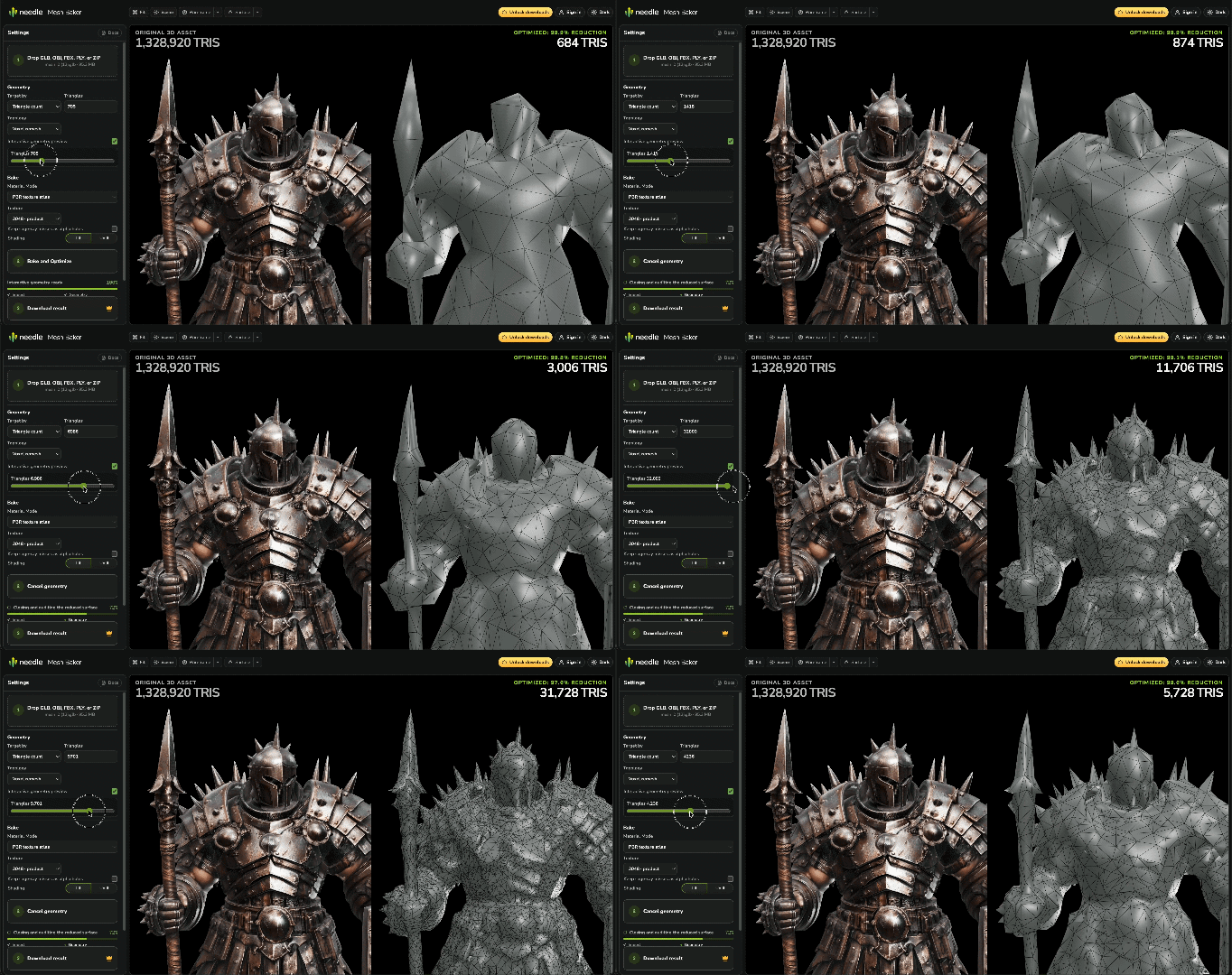 *You drag the triangle budget, and the result rebuilds while you drag. This model goes from 1,328,920 triangles to 6,830.*
## Why this is not just decimation
A sculpt can carry fine detail as geometry, from scratches to feathers and bolts. At large reductions, simplification alone can lose that surface detail. Baking preserves much of it in textures on the reduced mesh.
The workflow is to create a web-ready mesh, give it new UVs and tangents, then transfer the original's surface appearance into textures. A normal map recreates fine detail through shading. Larger shapes and the silhouette still depend on the mesh.
The baker combines simplification, UV creation and texture baking in one step, including tangent-space and normal-map setup.
*You drag the triangle budget, and the result rebuilds while you drag. This model goes from 1,328,920 triangles to 6,830.*
## Why this is not just decimation
A sculpt can carry fine detail as geometry, from scratches to feathers and bolts. At large reductions, simplification alone can lose that surface detail. Baking preserves much of it in textures on the reduced mesh.
The workflow is to create a web-ready mesh, give it new UVs and tangents, then transfer the original's surface appearance into textures. A normal map recreates fine detail through shading. Larger shapes and the silhouette still depend on the mesh.
The baker combines simplification, UV creation and texture baking in one step, including tangent-space and normal-map setup.
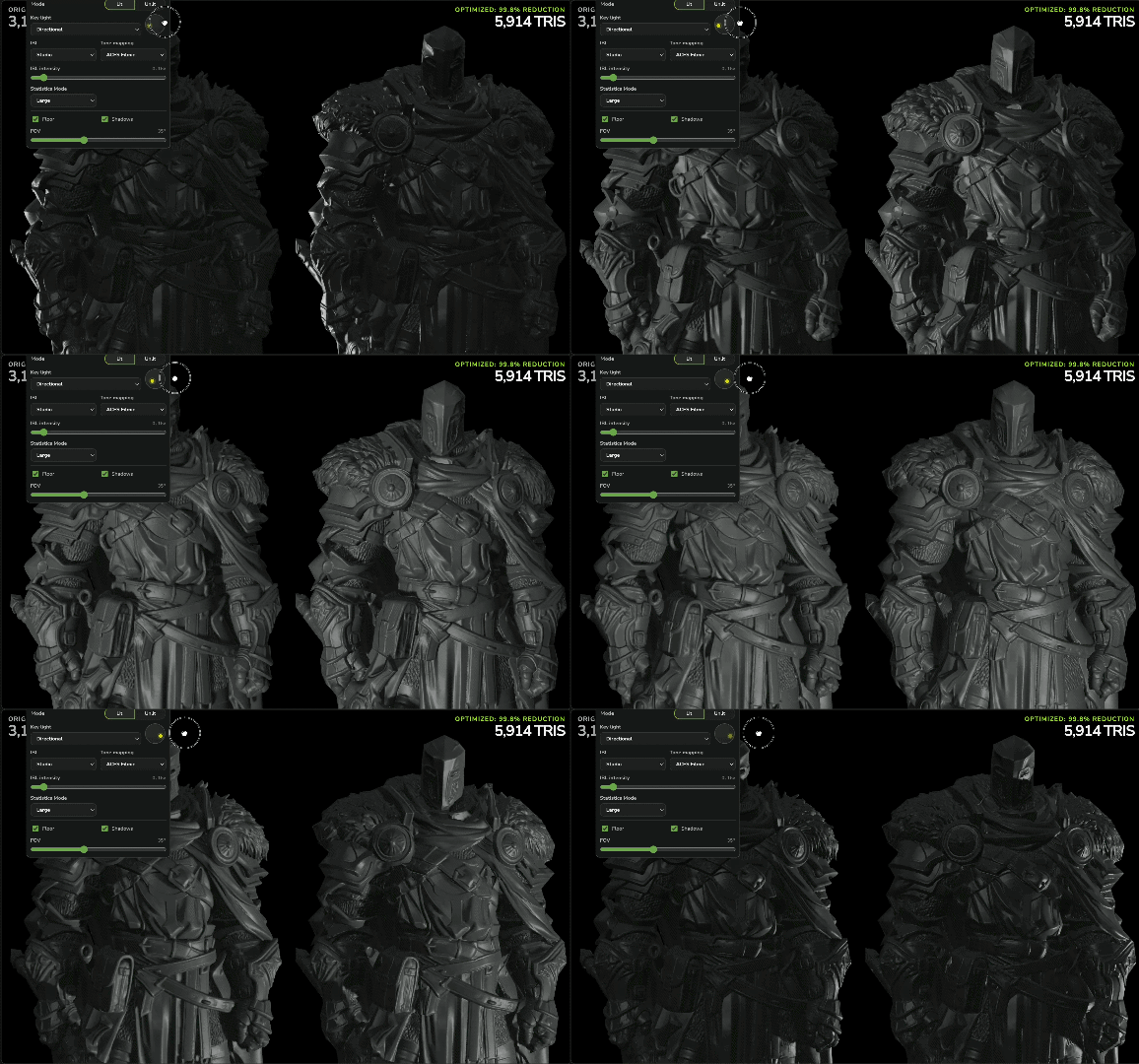 *The key light moves across both models. The result has 5,914 triangles, so its detail comes from the baked normal map and not from geometry.*
## Getting models in
| Source | Notes |
|---|---|
| `.glb` / `.gltf` | Loaded directly |
| `.obj` + `.mtl` + textures | Select all files together |
| `.fbx` | Loaded directly |
| `.zip` | An archive containing any of the above, with relative paths preserved |
| Needle Cloud | Sign in to pick a model from your own asset library |
Skinned `.glb`, `.gltf` and `.fbx` assets can retain their skin, hierarchy and animation clips. Animation mode controls whether optimization measures all clips, uses only the authored pose, or freezes the selected preview frame into static geometry.
## Geometry methods
Choose the method that matches the source asset and the result you need:
- **Simplify** reduces the source topology to a triangle target or measured surface-error target. It is the best fit for clean, deliberately authored meshes.
- **Voxel remesh** rebuilds topology on a voxel grid before reduction. It can combine disconnected parts and clean up scans, generated assets, CAD imports and broken geometry.
- **Wrap** creates a watertight conservative outer shell. Controls for minimum hole size and offset help produce robust collision meshes, proxy geometry and aggressive low-detail representations.
- **Bake textures only** keeps the source geometry while rebaking its appearance, which is useful when material and draw-call cost—not topology—is the main problem.
## Reduce materials and draw calls
A model can have a reasonable triangle count and still render slowly because every material or primitive adds another draw call. Mesh Baker can atlas compatible source materials and bake their base color, normal, roughness, metallic, emissive, opacity and ambient occlusion into a consolidated result.
For compatible static workflows this can turn many input draw calls into one. Document-preserving workflows can instead retain materials and hierarchy when those are more important than maximum consolidation. The workbench reports input and output draw calls so the result is measurable rather than assumed.
## Animation baking and skinned mesh optimization
Mesh Baker supports animation-aware optimization for skinned 3D assets, including glTF/GLB and FBX. You can preview clips and poses before baking, then choose how motion affects the result:
- **Optimize for clips** samples the animations, retains the rig and clips, and protects geometry needed across the poses.
- **Ignore clips** retains the animated document but optimizes against its authored pose.
- **Freeze pose** converts the selected animation frame into a static optimized asset.
Animation-aware surface-error targeting can decide how many triangles are necessary instead of forcing one fixed budget. This makes the workflow useful for animated characters and moving props as well as static assets.
## Comparing before and after
Optimization is only worth it if you can see what it cost you. The workbench is built around two viewers with synchronized cameras — source on the left, result on the right:
- **Isolate any channel** — the finished result, the bare mesh, or a single map such as base color, normal or roughness
- **Wireframe overlay**, so you can see where the triangles actually went
- **Preview lighting** — light type, environment, tone mapping, floor and shadows, applied identically to both sides
- **A quality score** — measure the difference between source and result alongside your visual comparison
- **Every baked texture**, shown as it came out
*The key light moves across both models. The result has 5,914 triangles, so its detail comes from the baked normal map and not from geometry.*
## Getting models in
| Source | Notes |
|---|---|
| `.glb` / `.gltf` | Loaded directly |
| `.obj` + `.mtl` + textures | Select all files together |
| `.fbx` | Loaded directly |
| `.zip` | An archive containing any of the above, with relative paths preserved |
| Needle Cloud | Sign in to pick a model from your own asset library |
Skinned `.glb`, `.gltf` and `.fbx` assets can retain their skin, hierarchy and animation clips. Animation mode controls whether optimization measures all clips, uses only the authored pose, or freezes the selected preview frame into static geometry.
## Geometry methods
Choose the method that matches the source asset and the result you need:
- **Simplify** reduces the source topology to a triangle target or measured surface-error target. It is the best fit for clean, deliberately authored meshes.
- **Voxel remesh** rebuilds topology on a voxel grid before reduction. It can combine disconnected parts and clean up scans, generated assets, CAD imports and broken geometry.
- **Wrap** creates a watertight conservative outer shell. Controls for minimum hole size and offset help produce robust collision meshes, proxy geometry and aggressive low-detail representations.
- **Bake textures only** keeps the source geometry while rebaking its appearance, which is useful when material and draw-call cost—not topology—is the main problem.
## Reduce materials and draw calls
A model can have a reasonable triangle count and still render slowly because every material or primitive adds another draw call. Mesh Baker can atlas compatible source materials and bake their base color, normal, roughness, metallic, emissive, opacity and ambient occlusion into a consolidated result.
For compatible static workflows this can turn many input draw calls into one. Document-preserving workflows can instead retain materials and hierarchy when those are more important than maximum consolidation. The workbench reports input and output draw calls so the result is measurable rather than assumed.
## Animation baking and skinned mesh optimization
Mesh Baker supports animation-aware optimization for skinned 3D assets, including glTF/GLB and FBX. You can preview clips and poses before baking, then choose how motion affects the result:
- **Optimize for clips** samples the animations, retains the rig and clips, and protects geometry needed across the poses.
- **Ignore clips** retains the animated document but optimizes against its authored pose.
- **Freeze pose** converts the selected animation frame into a static optimized asset.
Animation-aware surface-error targeting can decide how many triangles are necessary instead of forcing one fixed budget. This makes the workflow useful for animated characters and moving props as well as static assets.
## Comparing before and after
Optimization is only worth it if you can see what it cost you. The workbench is built around two viewers with synchronized cameras — source on the left, result on the right:
- **Isolate any channel** — the finished result, the bare mesh, or a single map such as base color, normal or roughness
- **Wireframe overlay**, so you can see where the triangles actually went
- **Preview lighting** — light type, environment, tone mapping, floor and shadows, applied identically to both sides
- **A quality score** — measure the difference between source and result alongside your visual comparison
- **Every baked texture**, shown as it came out
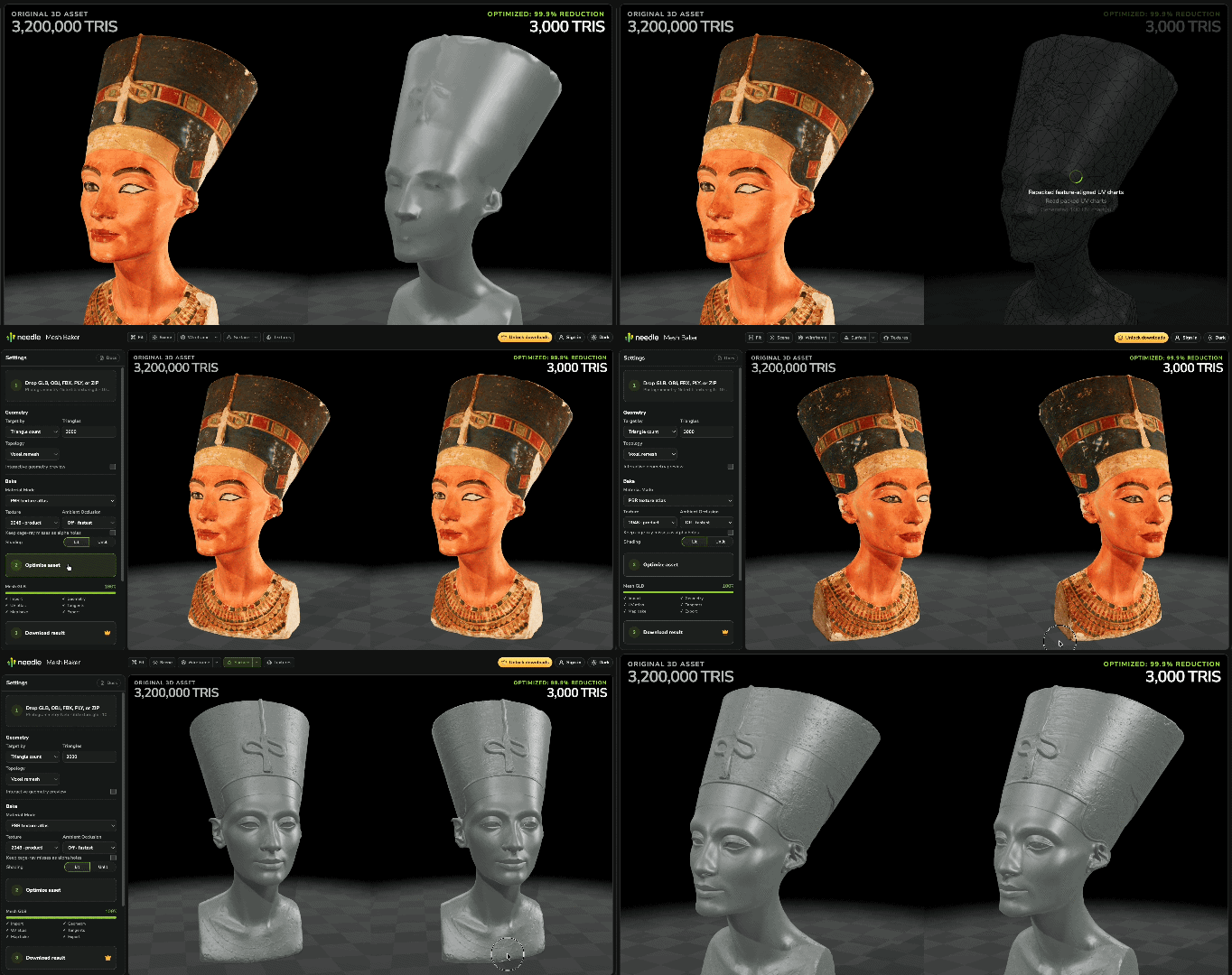 *The model on the left has 3,200,000 triangles. The model on the right has 3,000. That is a reduction of 99.9%.*
## Bake from the Needle Inspector
From **[Needle Inspector](/docs/three/needle-devtools-for-threejs-chrome-extension) 2.5** you can bake without leaving the scene the mesh belongs to.
Drag whatever you want from the hierarchy into a group — one object or a hundred — and bake each group on its own. A group comes back as one mesh, with transparent surfaces kept apart from opaque ones because they cannot share a material. A scene built from many small parts loses most of its draw calls along with its triangles.
The result goes straight back into the running scene. There is no Apply step and no re-import, and a toggle switches between the original and the baked version so you can compare the two in place, at the size and lighting they will actually ship with. Adjust the budget, bake again, toggle again.
The two windows talk to each other directly. The mesh does not travel through a server, and it is not uploaded any more than a dropped file is.
## Let an AI agent drive it
The baker registers itself as a set of [WebMCP](https://webmachinelearning.github.io/webmcp/) tools, so an AI agent in your browser can bake a model by calling them instead of clicking through the interface. Ask for what you want in plain language and watch it happen in the workbench in front of you.
> *"Load this model, get it under 10k triangles, show me the wireframe, and download it when it looks right."*
*ChatGPT calling the baker's WebMCP tools: it loads the model, sets the budget, runs the bake and checks the result — in the same workbench you would have clicked through yourself.*
Agents can load a model from a URL or from your Needle Cloud library, change any build setting, run the bake, take screenshots of the before/after previews to check their own work, and download or upload the result. Screenshots matter here: a triangle count tells an agent that the model got smaller, not whether it still looks right.
**Generation is a tool too.** An agent can ask the baker to build a model from a description or an image and then optimize it, all in one conversation — or hand over a model it made itself, like the
*The model on the left has 3,200,000 triangles. The model on the right has 3,000. That is a reduction of 99.9%.*
## Bake from the Needle Inspector
From **[Needle Inspector](/docs/three/needle-devtools-for-threejs-chrome-extension) 2.5** you can bake without leaving the scene the mesh belongs to.
Drag whatever you want from the hierarchy into a group — one object or a hundred — and bake each group on its own. A group comes back as one mesh, with transparent surfaces kept apart from opaque ones because they cannot share a material. A scene built from many small parts loses most of its draw calls along with its triangles.
The result goes straight back into the running scene. There is no Apply step and no re-import, and a toggle switches between the original and the baked version so you can compare the two in place, at the size and lighting they will actually ship with. Adjust the budget, bake again, toggle again.
The two windows talk to each other directly. The mesh does not travel through a server, and it is not uploaded any more than a dropped file is.
## Let an AI agent drive it
The baker registers itself as a set of [WebMCP](https://webmachinelearning.github.io/webmcp/) tools, so an AI agent in your browser can bake a model by calling them instead of clicking through the interface. Ask for what you want in plain language and watch it happen in the workbench in front of you.
> *"Load this model, get it under 10k triangles, show me the wireframe, and download it when it looks right."*
*ChatGPT calling the baker's WebMCP tools: it loads the model, sets the budget, runs the bake and checks the result — in the same workbench you would have clicked through yourself.*
Agents can load a model from a URL or from your Needle Cloud library, change any build setting, run the bake, take screenshots of the before/after previews to check their own work, and download or upload the result. Screenshots matter here: a triangle count tells an agent that the model got smaller, not whether it still looks right.
**Generation is a tool too.** An agent can ask the baker to build a model from a description or an image and then optimize it, all in one conversation — or hand over a model it made itself, like the  ChatGPT app does. Either way the generated mesh arrives dense, which is exactly what the rest of the workbench is for: ask for the thing you want, then ask for it under a triangle budget.
**Where it works**
| Browser | Status |
|---|---|
| ChatGPT Atlas | Works out of the box |
| Microsoft Edge 147+ | Works out of the box |
| Chrome 149+ | Works out of the box |
| Firefox, Safari | Not yet |
WebMCP is still being standardized, so Chrome only exposes it to sites carrying an origin-trial token. The baker ships one, which is why it works there without you turning on a flag.
Since it is the ChatGPT app's own browser doing the calling, this works directly — no server to run, no configuration, no separate MCP setup. On browsers without WebMCP nothing is registered and nothing is downloaded, so there is no cost to it being there.
Baking still happens entirely on your machine. An agent drives the same in-browser pipeline you do. Uploading a result to Needle Cloud requires your request. Information returned to your agent, such as preview screenshots or model data you ask it to retrieve, is handled by that agent and its provider.
## More workflows
- **Octahedral and pixel impostors** replace distant or repeated models with much cheaper representations that preserve their appearance from changing viewpoints.
- **Gaussian splat to mesh** turns a `.ply` splat capture into a regular textured glTF mesh without requiring a splat renderer at runtime.
## Coming soon
**Quad remeshing.** A clean quad topology for the workflows that need one, rather than the triangles a real-time renderer is happy with.
**Vertex color bakes with PBR.** Appearance carried in the vertices instead of a texture, for models small enough that a texture is the larger half of the file.
See the live [Mesh Baker roadmap](https://mesh-baker.needle.tools/roadmap/) for features still in development.
## Downloads and licensing
Everything up to the download is free. You can bring as many models as you like, bake them, and compare the results before deciding whether it is worth anything to you.
| | Free | Mesh Baker |
|---|---|---|
| Load models, bake, preview, compare | ✅ | ✅ |
| Quality metrics and channel inspection | ✅ | ✅ |
| Drive it with an AI agent | ✅ | ✅ |
| **Download the baked `.glb`** | — | ✅ |
| Upload results to Needle Cloud | — | ✅ |
| Needle account required | — | free account |
### What it costs
**A one-time purchase with lifetime access.** No subscription, no seats to renew, no limit on how many models you bake — it stays yours. The current price, and any running discount, is shown in the purchase dialog.
Already have **[Needle Engine Pro](https://needle.tools/pricing)**? The Mesh Baker is included. Sign in and it unlocks.
### What you get after that
**Every update, at no extra cost.** The baker is developed continuously, and what is [coming next](#coming-soon) arrives as part of the purchase you already made — not as a new product to buy again.
### Batch and CI use
A **command-line version** is available on request, so baking can run as a build step or over a whole folder of models instead of one at a time. It is licensed separately — write to [hi@needle.tools](mailto:hi@needle.tools?subject=Needle%20Mesh%20Baker%20CLI).
## Requirements
- Works best on a desktop browser — Chrome, Edge or another Chromium-based browser. On a phone the workbench says so and lets you continue anyway
- Baking uses your graphics card, so a machine that can run 3D content comfortably will bake comfortably
- Everything runs locally, which means no upload wait and no queue — bake times and the size of model you can handle depend on your machine
## FAQ
### Do I need an account to try it?
No. Loading local files, baking and comparing results work signed out. You need an account to **download** a result, browse your Needle Cloud assets or upload a result to Needle Cloud.
### Is it a subscription?
No. One-time purchase, lifetime access, and updates are included as the baker keeps being developed. It also comes with [Needle Engine Pro](https://needle.tools/pricing) if you already have that.
### Is there a limit on how many models I can bake?
**No.** The browser version has no limit — not per month, and not in total. Load as many models as you want and bake them as often as you want. Processing runs on your machine, with no per-model usage quota.
This covers interactive use in the browser, including asking an AI agent to operate the workbench for you. Batch processing, CI build steps and services that bake models for other people require the separately licensed [command-line version](#batch-and-ci-use).
### Is my model uploaded to Needle?
**Not for baking.** Importing local files, geometry reduction, texture baking and preview all run inside your browser. You can save the result as a local download.
Loading an asset from Needle Cloud downloads it to your browser. Choosing to upload a result sends the model and its file name to your Needle Cloud library. This is optional and is not required to bake or download locally.
### Do you collect mesh names, material names or file names?
Usage events do not include object, mesh, material, texture or file names, or geometry and texture data. If you choose to upload a result to Needle Cloud, the upload includes the model and its file name.
The baker sends coarse usage statistics to understand which model sizes, features and settings people use. While you are signed in they are linked to your Needle account, the same way the rest of your account activity is.
- Size, triangle and vertex counts as ranges (*5–10MB*, *200k–1M*), never exact numbers
- Mesh and material counts, grouped into ranges
- Whether things like normals, UVs, vertex colors or skinning are present
- The file type, and the settings you picked
- Milestones — model loaded, bake started, bake finished, result downloaded
Failures also report a shortened error message so we can fix what broke. Error messages can contain names or paths supplied by a loader or browser; shortening a message does not remove that information.
### Does it work offline?
The page itself has to load once, but the baking pipeline does not talk to a server, so the actual work does not depend on your connection.
### Where can I use the results?
Anywhere. The output is industry-standard glTF with PBR materials, so it opens in Needle Engine, three.js, React Three Fiber, Blender, Unity, or any other software that reads glTF. Nothing about it is Needle-specific.
The baked textures come out uncompressed, so they stay sharp for whatever you do next. Run them through your usual texture compression on the way into your project — a Needle Engine production build does this for you and converts them to GPU-compressed KTX2 automatically. See [Optimization & Compression](/docs/how-to-guides/optimization/).
### Do I own the results? Can I use them commercially?
**Yes.** Your source model stays yours, and the result is yours too — both baked models and generated ones. Use them commercially, ship them in a product, sell them, or redistribute them. There are no royalties, no revenue share, and no attribution requirement. Needle takes no rights to your models or your results.
Baking does not change who owns the source. A model that you bought from a marketplace, or that another artist made, keeps the license it came with. Generation does not create rights either. If you have no right to the image you used, or to the character you asked for, you have no right to the model that comes out. You are responsible for what you put into the baker and for what you do with the result. See the [EULA](https://needle.tools/eula).
### Can I bake animated or skinned characters?
Yes. For a skinned or animated glTF/GLB or FBX asset, choose **Optimize for clips** to retain the rig and animation clips while the baker samples motion during optimization. Choose **Ignore clips** to retain the animated document while optimizing its authored pose, or **Freeze pose** when you want a static result from one selected animation frame.
### My model looks wrong after baking. What should I change?
Start with how the model is simplified. Rebuilding the surface is the better default for scans, CAD and models with broken geometry, but it can round off sharp edges — for something clean and deliberately modelled, reduce its own triangles instead. If small parts vanish, protect them from the budget. If hard edges soften, adjust the settings to preserve them. And look at the result with the wireframe and the channel views before changing the triangle budget: a texture problem can look a lot like a geometry problem.
### How does this relate to progressive loading?
They solve different halves of the problem, and they compose. The baker decides **how detailed the asset is at all** — bring the source down to the highest quality you would ever want on screen. [Progressive loading](/docs/how-to-guides/optimization/progressive-loading-and-lods) then decides **how much of that arrives when**, streaming the detail in as it is needed.
Bake first: progressive loading of an unoptimized model still delivers every triangle eventually.
### Can I run it in my own pipeline or CI?
Yes — a command-line version exists for exactly that, so baking can run as a build step or over a whole folder of models. It is licensed separately: write to [hi@needle.tools](mailto:hi@needle.tools?subject=Needle%20Mesh%20Baker%20CLI).
### Who builds it?
Needle — the team behind [Needle Engine](/docs/), the [Needle Inspector](/docs/three/needle-devtools-for-threejs-chrome-extension), and the Unity and Blender integrations. The people building it are industry professionals with 15+ years in real-time 3D, and the baker exists because we kept hitting the same problem in our own production work.
## Next Steps
- [Needle Inspector](/docs/three/needle-devtools-for-threejs-chrome-extension) — inspect, debug and live-edit three.js scenes in your browser
- [Optimization & Compression](/docs/how-to-guides/optimization/) — texture compression, mesh compression, progressive loading and LODs
- [Needle Engine + three.js](/docs/three/) — using Needle Engine in three.js projects
ChatGPT app does. Either way the generated mesh arrives dense, which is exactly what the rest of the workbench is for: ask for the thing you want, then ask for it under a triangle budget.
**Where it works**
| Browser | Status |
|---|---|
| ChatGPT Atlas | Works out of the box |
| Microsoft Edge 147+ | Works out of the box |
| Chrome 149+ | Works out of the box |
| Firefox, Safari | Not yet |
WebMCP is still being standardized, so Chrome only exposes it to sites carrying an origin-trial token. The baker ships one, which is why it works there without you turning on a flag.
Since it is the ChatGPT app's own browser doing the calling, this works directly — no server to run, no configuration, no separate MCP setup. On browsers without WebMCP nothing is registered and nothing is downloaded, so there is no cost to it being there.
Baking still happens entirely on your machine. An agent drives the same in-browser pipeline you do. Uploading a result to Needle Cloud requires your request. Information returned to your agent, such as preview screenshots or model data you ask it to retrieve, is handled by that agent and its provider.
## More workflows
- **Octahedral and pixel impostors** replace distant or repeated models with much cheaper representations that preserve their appearance from changing viewpoints.
- **Gaussian splat to mesh** turns a `.ply` splat capture into a regular textured glTF mesh without requiring a splat renderer at runtime.
## Coming soon
**Quad remeshing.** A clean quad topology for the workflows that need one, rather than the triangles a real-time renderer is happy with.
**Vertex color bakes with PBR.** Appearance carried in the vertices instead of a texture, for models small enough that a texture is the larger half of the file.
See the live [Mesh Baker roadmap](https://mesh-baker.needle.tools/roadmap/) for features still in development.
## Downloads and licensing
Everything up to the download is free. You can bring as many models as you like, bake them, and compare the results before deciding whether it is worth anything to you.
| | Free | Mesh Baker |
|---|---|---|
| Load models, bake, preview, compare | ✅ | ✅ |
| Quality metrics and channel inspection | ✅ | ✅ |
| Drive it with an AI agent | ✅ | ✅ |
| **Download the baked `.glb`** | — | ✅ |
| Upload results to Needle Cloud | — | ✅ |
| Needle account required | — | free account |
### What it costs
**A one-time purchase with lifetime access.** No subscription, no seats to renew, no limit on how many models you bake — it stays yours. The current price, and any running discount, is shown in the purchase dialog.
Already have **[Needle Engine Pro](https://needle.tools/pricing)**? The Mesh Baker is included. Sign in and it unlocks.
### What you get after that
**Every update, at no extra cost.** The baker is developed continuously, and what is [coming next](#coming-soon) arrives as part of the purchase you already made — not as a new product to buy again.
### Batch and CI use
A **command-line version** is available on request, so baking can run as a build step or over a whole folder of models instead of one at a time. It is licensed separately — write to [hi@needle.tools](mailto:hi@needle.tools?subject=Needle%20Mesh%20Baker%20CLI).
## Requirements
- Works best on a desktop browser — Chrome, Edge or another Chromium-based browser. On a phone the workbench says so and lets you continue anyway
- Baking uses your graphics card, so a machine that can run 3D content comfortably will bake comfortably
- Everything runs locally, which means no upload wait and no queue — bake times and the size of model you can handle depend on your machine
## FAQ
### Do I need an account to try it?
No. Loading local files, baking and comparing results work signed out. You need an account to **download** a result, browse your Needle Cloud assets or upload a result to Needle Cloud.
### Is it a subscription?
No. One-time purchase, lifetime access, and updates are included as the baker keeps being developed. It also comes with [Needle Engine Pro](https://needle.tools/pricing) if you already have that.
### Is there a limit on how many models I can bake?
**No.** The browser version has no limit — not per month, and not in total. Load as many models as you want and bake them as often as you want. Processing runs on your machine, with no per-model usage quota.
This covers interactive use in the browser, including asking an AI agent to operate the workbench for you. Batch processing, CI build steps and services that bake models for other people require the separately licensed [command-line version](#batch-and-ci-use).
### Is my model uploaded to Needle?
**Not for baking.** Importing local files, geometry reduction, texture baking and preview all run inside your browser. You can save the result as a local download.
Loading an asset from Needle Cloud downloads it to your browser. Choosing to upload a result sends the model and its file name to your Needle Cloud library. This is optional and is not required to bake or download locally.
### Do you collect mesh names, material names or file names?
Usage events do not include object, mesh, material, texture or file names, or geometry and texture data. If you choose to upload a result to Needle Cloud, the upload includes the model and its file name.
The baker sends coarse usage statistics to understand which model sizes, features and settings people use. While you are signed in they are linked to your Needle account, the same way the rest of your account activity is.
- Size, triangle and vertex counts as ranges (*5–10MB*, *200k–1M*), never exact numbers
- Mesh and material counts, grouped into ranges
- Whether things like normals, UVs, vertex colors or skinning are present
- The file type, and the settings you picked
- Milestones — model loaded, bake started, bake finished, result downloaded
Failures also report a shortened error message so we can fix what broke. Error messages can contain names or paths supplied by a loader or browser; shortening a message does not remove that information.
### Does it work offline?
The page itself has to load once, but the baking pipeline does not talk to a server, so the actual work does not depend on your connection.
### Where can I use the results?
Anywhere. The output is industry-standard glTF with PBR materials, so it opens in Needle Engine, three.js, React Three Fiber, Blender, Unity, or any other software that reads glTF. Nothing about it is Needle-specific.
The baked textures come out uncompressed, so they stay sharp for whatever you do next. Run them through your usual texture compression on the way into your project — a Needle Engine production build does this for you and converts them to GPU-compressed KTX2 automatically. See [Optimization & Compression](/docs/how-to-guides/optimization/).
### Do I own the results? Can I use them commercially?
**Yes.** Your source model stays yours, and the result is yours too — both baked models and generated ones. Use them commercially, ship them in a product, sell them, or redistribute them. There are no royalties, no revenue share, and no attribution requirement. Needle takes no rights to your models or your results.
Baking does not change who owns the source. A model that you bought from a marketplace, or that another artist made, keeps the license it came with. Generation does not create rights either. If you have no right to the image you used, or to the character you asked for, you have no right to the model that comes out. You are responsible for what you put into the baker and for what you do with the result. See the [EULA](https://needle.tools/eula).
### Can I bake animated or skinned characters?
Yes. For a skinned or animated glTF/GLB or FBX asset, choose **Optimize for clips** to retain the rig and animation clips while the baker samples motion during optimization. Choose **Ignore clips** to retain the animated document while optimizing its authored pose, or **Freeze pose** when you want a static result from one selected animation frame.
### My model looks wrong after baking. What should I change?
Start with how the model is simplified. Rebuilding the surface is the better default for scans, CAD and models with broken geometry, but it can round off sharp edges — for something clean and deliberately modelled, reduce its own triangles instead. If small parts vanish, protect them from the budget. If hard edges soften, adjust the settings to preserve them. And look at the result with the wireframe and the channel views before changing the triangle budget: a texture problem can look a lot like a geometry problem.
### How does this relate to progressive loading?
They solve different halves of the problem, and they compose. The baker decides **how detailed the asset is at all** — bring the source down to the highest quality you would ever want on screen. [Progressive loading](/docs/how-to-guides/optimization/progressive-loading-and-lods) then decides **how much of that arrives when**, streaming the detail in as it is needed.
Bake first: progressive loading of an unoptimized model still delivers every triangle eventually.
### Can I run it in my own pipeline or CI?
Yes — a command-line version exists for exactly that, so baking can run as a build step or over a whole folder of models. It is licensed separately: write to [hi@needle.tools](mailto:hi@needle.tools?subject=Needle%20Mesh%20Baker%20CLI).
### Who builds it?
Needle — the team behind [Needle Engine](/docs/), the [Needle Inspector](/docs/three/needle-devtools-for-threejs-chrome-extension), and the Unity and Blender integrations. The people building it are industry professionals with 15+ years in real-time 3D, and the baker exists because we kept hitting the same problem in our own production work.
## Next Steps
- [Needle Inspector](/docs/three/needle-devtools-for-threejs-chrome-extension) — inspect, debug and live-edit three.js scenes in your browser
- [Optimization & Compression](/docs/how-to-guides/optimization/) — texture compression, mesh compression, progressive loading and LODs
- [Needle Engine + three.js](/docs/three/) — using Needle Engine in three.js projects